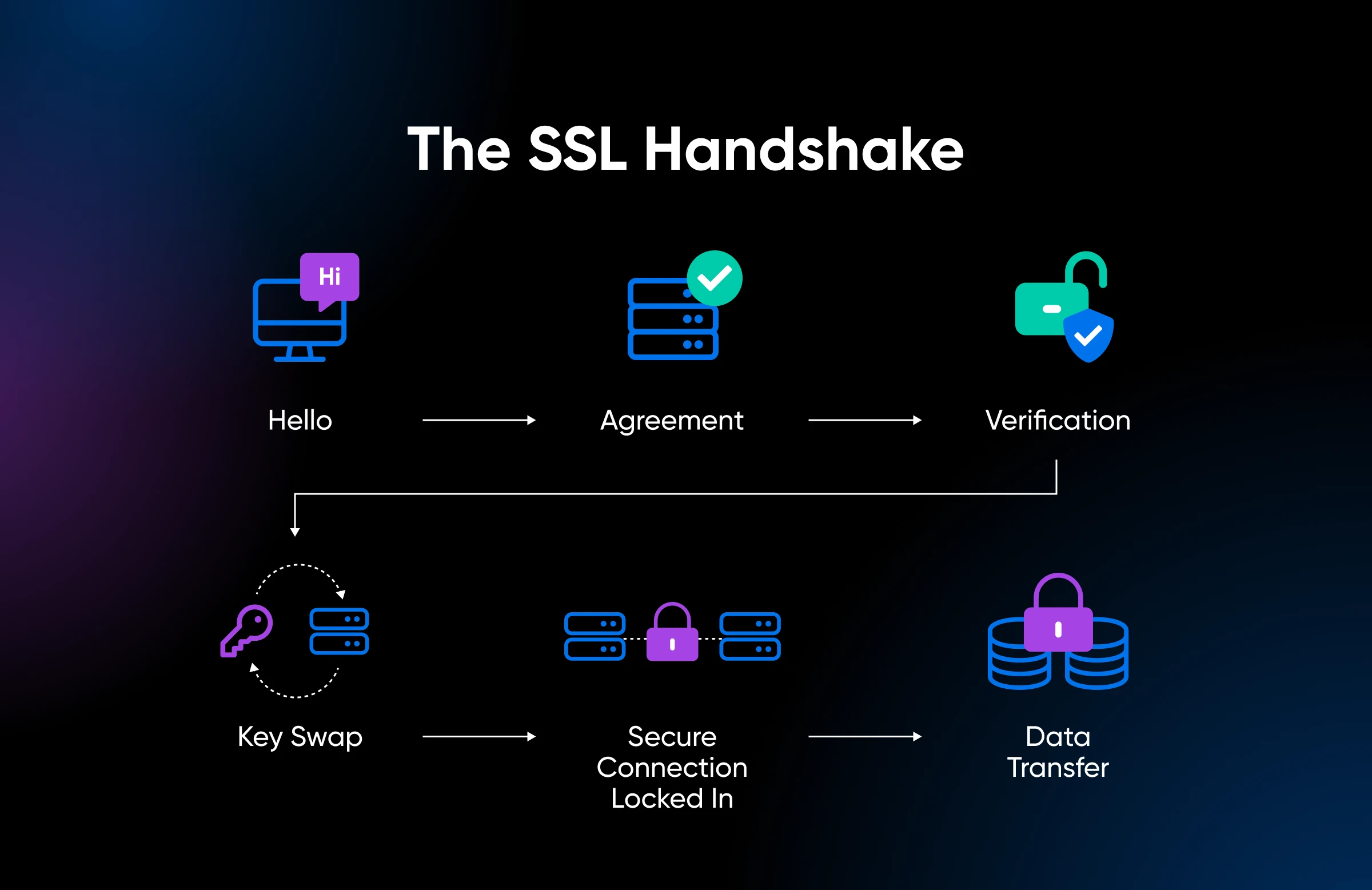
Every time you visit a website that starts with “https,” something remarkable happens in the background before you even see the first pixel of that page load. Your browser and the website’s server have a very brief but very important conversation. They introduce themselves, verify each other’s trustworthiness, agree on how they are going to communicate securely, and then shake hands on the deal. All of this happens in a fraction of a second, completely invisible to you.
That process is called an SSL handshake, and it is the foundation of secure communication on the internet. It is the reason your credit card details do not get stolen when you shop online, the reason your login credentials stay private, and the reason you can trust that the website you are visiting is actually who it claims to be.
Most explanations of the SSL handshake are written for software engineers and are packed with technical terminology that makes the average person’s eyes glaze over. This post is not that. This post is going to explain exactly how an SSL handshake works in plain, simple language that anyone can understand.
First, Let’s Understand What SSL Actually Is
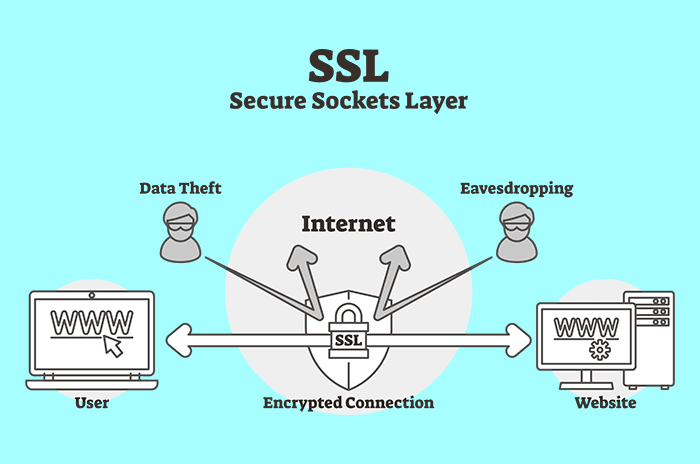
SSL stands for Secure Sockets Layer. It is a security protocol that was originally developed in the 1990s to create an encrypted connection between a web server and a browser. Over the years, SSL was updated and eventually replaced by a more modern and more secure version called TLS, which stands for Transport Layer Security.
Here is something slightly confusing: most people still call it SSL even though TLS is what is actually being used today. When your hosting provider says they offer a free SSL certificate, they are technically giving you a TLS certificate. The industry just kept using the familiar term SSL out of habit. For the purposes of this post, we will use both terms interchangeably, just as the rest of the internet does.
The whole purpose of SSL and TLS is to do two things. First, it encrypts the data traveling between your browser and the server so that nobody in the middle can read it. Second, it authenticates the server, meaning it verifies that the website you are connecting to is genuinely who it claims to be and not an impostor.
The SSL handshake is the process that makes both of those things possible.
Think of It Like Meeting a Stranger Safely
Before diving into the actual steps, here is a helpful way to think about the SSL handshake.
Imagine you need to have a private conversation with someone you have never met before. Before you can start talking confidentially, a few things need to happen. You need to confirm that this person is actually who they say they are. You both need to agree on a secret language that only the two of you understand. And you need to exchange just enough information to set up that secret language without letting anyone nearby figure out what the code is.
That is essentially what an SSL handshake does between your browser and a web server. It is the process of establishing mutual trust and agreeing on a secure communication method before any sensitive data is exchanged.
Step One: The Client Says Hello
The SSL handshake begins the moment your browser tries to connect to a secure website. Your browser, which is referred to as the client in this process, sends the first message to the server. This opening message is called the ClientHello.
The ClientHello message contains several important pieces of information. It tells the server which TLS version the browser supports, such as TLS 1.2 or TLS 1.3. It includes a list of cipher suites that the browser is capable of using, which are essentially the different encryption methods available. It also includes a randomly generated string of characters called the client random, which will be used later in the process to generate the encryption keys.
Think of the ClientHello as your browser walking up to the server and saying: “Hi, here is who I am, here are the ways I know how to speak securely, and here is a random number I just generated. Let’s figure out how to talk privately.”
Step Two: The Server Responds
After receiving the ClientHello, the server responds with its own message called the ServerHello.
In the ServerHello, the server picks the highest TLS version that both the browser and the server support. It also chooses one cipher suite from the list the browser provided, selecting the strongest and most compatible option available. And just like the browser, the server generates and sends its own randomly generated string of characters, called the server random.
Following the ServerHello, the server sends something extremely important: its SSL certificate. This certificate is essentially the server’s digital identity card. It contains the server’s public key, the name of the website it belongs to, the name of the Certificate Authority (CA) that issued it, and the certificate’s expiration date.
Think of this step as the server responding: “Hello, here is my identity card to prove I am who I say I am. Here is the encryption method I have chosen for us to use. And here is my own random number.”
Step Three: The Browser Checks the Certificate
This is one of the most critical steps in the entire process. Before the conversation goes any further, your browser needs to verify that the server’s SSL certificate is legitimate and trustworthy.
Your browser does this by checking several things. It confirms that the certificate was issued by a trusted Certificate Authority (CA), which is an organization that is universally recognized as a trustworthy verifier of website identities. Examples of well-known Certificate Authorities include DigiCert, Let’s Encrypt, Comodo, and GlobalSign. Your browser and operating system come pre-loaded with a list of trusted Certificate Authorities, so they know immediately whether to trust a certificate or not.
The browser also checks that the certificate has not expired and that the domain name on the certificate matches the domain name of the website you are trying to visit. If you are visiting www.yourbank.com and the certificate says it belongs to www.yourbank.com, everything checks out. If the certificate belongs to a completely different domain, your browser will immediately show you a warning page telling you the connection is not secure.
This verification step is what protects you from phishing attacks, where malicious websites try to impersonate legitimate ones. A fake website pretending to be your bank cannot obtain a valid SSL certificate for your bank’s domain name, so the SSL handshake will fail and your browser will warn you before you ever enter any personal information.
Step Four: Creating the Pre-Master Secret
Once the browser is satisfied that the server’s certificate is legitimate, the next step is to begin creating the shared encryption key that will protect all the data exchanged during the session.
The browser generates a new random value called the pre-master secret. This value is then encrypted using the server’s public key, which was included in the SSL certificate that the server sent in the previous step.
Here is the clever part. When you encrypt something with a public key, only the matching private key can decrypt it. The server’s private key is stored exclusively on the server and is never shared with anyone. So even if a malicious third party is intercepting the network traffic and watching this entire handshake happen, they cannot decrypt the pre-master secret because they do not have the server’s private key.
The browser sends this encrypted pre-master secret to the server. The server then uses its private key to decrypt it. Now both the browser and the server have all three pieces of information they need: the client random, the server random, and the pre-master secret. Using these three values together, both sides independently calculate the exact same session key, which is the final encryption key that will be used to protect all communication during this browsing session.
Step Five: Both Sides Confirm They Are Ready
At this point, both the browser and the server have independently generated the same session key without ever directly sending it over the network. Now they need to confirm that everything worked correctly and that they are both ready to start communicating securely.
The browser sends a Finished message to the server. This message is encrypted using the newly created session key, and it contains a hash, which is essentially a digital fingerprint, of everything that has been communicated during the handshake so far.
The server does the same thing. It sends back its own Finished message, also encrypted with the session key, containing its own hash of the handshake communication.
Both sides then verify each other’s Finished messages. If the hashes match and the decryption works correctly, it confirms that the handshake was successful, the session key is identical on both sides, and no tampering occurred during the process. Everything is in order and the secure connection is officially established.
Step Six: The Secure Connection Is Live
Once both Finished messages have been verified, the SSL handshake is complete. From this point forward, all data exchanged between your browser and the server is encrypted using the session key that was established during the handshake.
This means that every page you load, every form you submit, every payment you make, and every message you send through that connection is scrambled into unreadable data before it leaves your device. Even if someone intercepts that data while it is traveling across the internet, all they will see is a stream of meaningless encrypted characters. Without the session key, which exists only in your browser and on the server, the data is completely useless to them.
This entire process, from the initial ClientHello to the final Finished messages, typically takes less than 100 milliseconds. You never notice it happening, but it is working tirelessly to protect your privacy every single time you connect to a secure website.
What Makes TLS 1.3 Faster and Better
If you have ever heard people talk about TLS 1.3 being superior to older versions, here is the simple reason why.
In older versions of TLS, the handshake process required two full round trips between the browser and the server before the secure connection was established. A round trip means the browser sends a message, waits for the server to respond, then sends another message and waits again. Each round trip adds a small but measurable amount of time to the connection process.
TLS 1.3 reduced this to just one round trip, cutting the connection setup time nearly in half compared to TLS 1.2. It also eliminated support for older, weaker cipher suites that were known to have security vulnerabilities, making the entire protocol significantly more resistant to modern attacks.
TLS 1.3 also introduced a feature called 0-RTT resumption, which stands for Zero Round Trip Time resumption. This feature allows a browser that has previously connected to a server to resume that connection almost instantly on a return visit, without needing to go through the full handshake process again. For regular website visitors, this means noticeably faster page loads on sites they visit frequently.
Why the Padlock Icon Matters More Than You Think
Most people have been taught to look for the padlock icon in their browser’s address bar as a sign that a website is safe. That is mostly good advice, but it is worth understanding exactly what that padlock does and does not tell you.
The padlock icon means that the connection between your browser and the website is encrypted. It means the SSL handshake completed successfully, the certificate is valid, and your data is protected in transit. That is genuinely important and worth looking for.
What the padlock does not tell you is whether the website itself is trustworthy or legitimate. A fraudulent website can still obtain a valid SSL certificate, which means it can still display the padlock icon. The padlock confirms that your connection to the website is secure. It does not confirm that the website is honest or that the people running it have good intentions.
This is why you should always look beyond the padlock and verify that the domain name in the address bar is exactly the website you intended to visit. Scammers often register domain names that look very similar to legitimate ones, such as “paypa1.com” instead of “paypal.com,” and then set up an SSL certificate on that fake domain to display the padlock and appear trustworthy. The padlock is a necessary but not sufficient signal of a safe website.
What Happens When the SSL Handshake Fails
Not every SSL handshake ends in a successful secure connection. Sometimes things go wrong, and understanding what those failures mean can help you make better decisions when your browser shows you a warning.
An SSL handshake failure can happen for several reasons. The server’s certificate might be expired, meaning it is past its validity date and has not been renewed. It might have a domain mismatch, where the certificate was issued for a different website than the one you are trying to visit. The certificate might have been revoked by the Certificate Authority that issued it, usually because it was compromised or found to be fraudulent. Or the browser and server might not share any compatible cipher suites, making it impossible for them to agree on an encryption method.
When the SSL handshake fails, your browser will show you an error page with a warning message. Common warnings include “Your connection is not private,” “NET::ERR_CERT_EXPIRED,” and “SSL_ERROR_RX_RECORD_TOO_LONG.” These warnings exist to protect you, and in most cases, you should take them seriously. Clicking through a security warning to visit a website means you are proceeding without the protection of a properly functioning SSL handshake, which puts your data at risk.
If you are a website owner and your visitors are seeing SSL warnings, it almost always means your SSL certificate needs to be renewed, reinstalled, or reconfigured. Most hosting providers make this process relatively straightforward, and many offer automatic SSL renewal to prevent certificates from expiring in the first place.
SSL Handshakes and Your E-commerce Store
If you run an e-commerce store, understanding the SSL handshake is not just interesting background knowledge. It is directly relevant to your business and your customers’ trust.
Every time a customer lands on your store, their browser performs an SSL handshake with your server. If that handshake succeeds and the padlock is visible, your customer knows immediately that the connection is secure and that their payment information will be protected. This visible signal of security has a measurable impact on customer trust and conversion rates. Studies consistently show that customers are more willing to complete a purchase on a website that visibly displays security indicators.
If that handshake fails and the browser shows a security warning, most customers will leave immediately without making a purchase. They will not stop to read the technical error message or investigate further. They will simply see that something looks wrong and go find a competitor whose website does not trigger warnings.
This is why keeping your SSL certificate valid, current, and properly configured is not just a technical task. It is a business-critical responsibility that directly affects your revenue and your reputation.
The Internet Would Not Be Safe Without It
It is easy to take the SSL handshake for granted because it happens so fast and so invisibly. But the process you have just learned about is one of the most important inventions in the history of the internet. Without it, online banking would be impossibly dangerous, e-commerce would never have become a trillion-dollar industry, and private communication over the web would be nothing more than wishful thinking.
Every time you see that little padlock in your browser, you are seeing the end result of a sophisticated cryptographic process that protects billions of internet users every single day. It is fast, it is automatic, and it works so well that most people never have to think about it.
Now you are one of the people who actually understands what is going on behind the scenes. And that knowledge makes you a smarter, safer, and more informed user of the internet.


You must be logged in to post a comment.