You have spent weeks writing great content, building backlinks, and optimizing your website for search engines. Your keyword research is solid, your meta descriptions are polished, and your internal linking structure is clean. But somehow, your pages are still not ranking where they should be. Sound familiar?
Here is something that a lot of website owners miss entirely: Google does not just care about what your website says. It cares deeply about how your website feels to use. Is it fast? Is it stable? Does it respond quickly when someone taps a button? These are not just nice-to-have qualities. They are now official ranking signals that Google uses to decide where your pages show up in search results.
That is exactly what Core Web Vitals are all about. And if you have not paid attention to them yet, this is the post that will change that.
What Are Core Web Vitals?
Core Web Vitals are a set of specific, measurable metrics introduced by Google that evaluate the real-world user experience of a webpage. They were officially announced in 2020 and became a confirmed Google ranking factor in 2021 as part of the broader Page Experience Update.
The idea behind Core Web Vitals is straightforward. Google wants to send its users to websites that not only have relevant content but also deliver a smooth, fast, and enjoyable experience. A webpage that loads slowly, shifts around unexpectedly, or takes forever to respond to a click is a frustrating experience, and Google has decided that frustrating experiences should not be rewarded with high rankings.
There are currently three Core Web Vitals metrics, each measuring a different dimension of the user experience. Understanding all three is the first step toward improving them.
The First Vital: Largest Contentful Paint (LCP)
Largest Contentful Paint, commonly abbreviated as LCP, measures how long it takes for the largest visible element on a webpage to fully load. This is usually the main hero image, a large block of text, or a video thumbnail at the top of the page.
Think of LCP as the moment when a visitor can actually see and engage with the main content of your page. Before that moment, they are essentially staring at a blank or partially loaded screen, which creates a poor first impression and often leads to them clicking the back button.
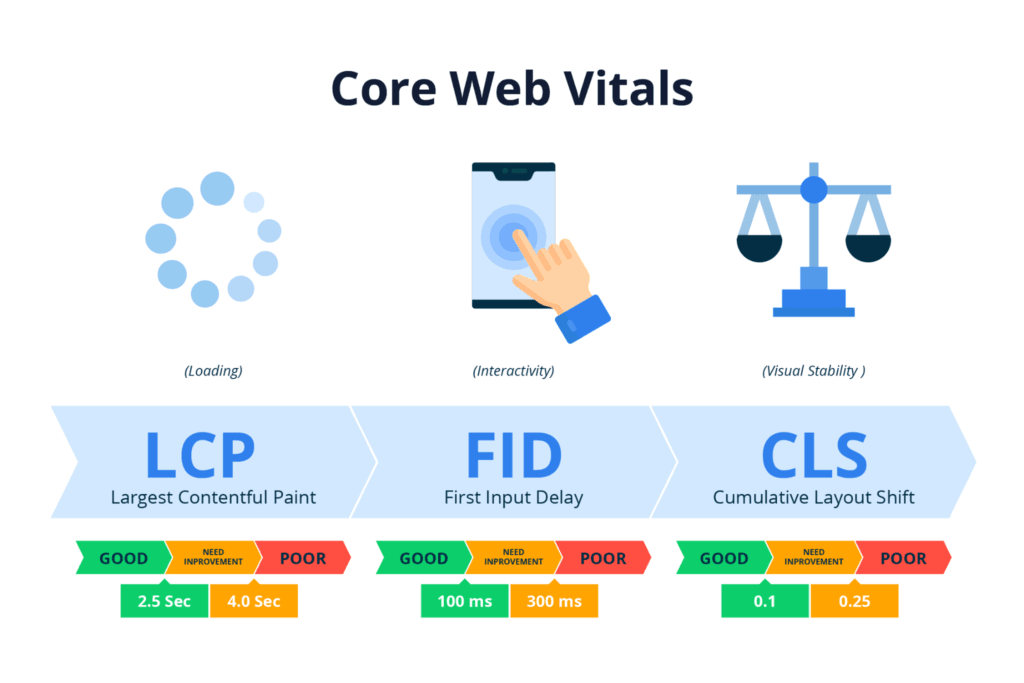
Google considers an LCP of 2.5 seconds or less to be a good score. An LCP between 2.5 and 4 seconds needs improvement, and anything above 4 seconds is considered poor. These thresholds are based on real user behavior data showing that visitors are significantly more likely to abandon a page when LCP crosses those boundaries.
The most common causes of a slow LCP include large unoptimized images, slow server response times, render-blocking resources like certain JavaScript or CSS files that prevent the page from loading, and the absence of proper caching strategies. Addressing these issues directly is the most reliable path to a strong LCP score.
The Second Vital: Interaction to Next Paint (INP)
Interaction to Next Paint, or INP, is the newest of the three Core Web Vitals. It replaced the older First Input Delay (FID) metric in March 2024 and measures the overall responsiveness of a webpage throughout the entire visit, not just the first interaction.
In simple terms, INP measures how quickly your page responds every time a user does something. This includes clicking a button, tapping a menu, selecting a dropdown, submitting a form, or any other interactive action. It captures the delay between the user’s action and the moment the page visually updates in response.
A good INP score is 200 milliseconds or less. A score between 200 and 500 milliseconds needs improvement, and anything above 500 milliseconds is considered poor. The lower the number, the more responsive and snappy your page feels to users.
A high INP score is usually caused by heavy JavaScript execution that keeps the browser’s main thread too busy to respond to user interactions quickly. Websites that use a lot of third-party scripts, complex animation frameworks, or bloated JavaScript libraries are particularly prone to poor INP scores. Reducing unnecessary JavaScript, deferring non-critical scripts, and breaking up long tasks into smaller chunks are the most effective ways to improve INP.
The Third Vital: Cumulative Layout Shift (CLS)
Cumulative Layout Shift, or CLS, measures the visual stability of a webpage as it loads. Specifically, it tracks how much the content on your page moves around unexpectedly while the page is loading or as new elements appear.
If you have ever started reading an article only to have an ad suddenly load above the text and push everything down so you lose your place, or tried to tap a button only to have it jump away from your finger at the last second because an image loaded above it, you have experienced a high CLS in action. It is genuinely one of the most frustrating things a user can experience on a website, and it happens far more often than most website owners realize.
Google considers a CLS score of 0.1 or less to be good. A score between 0.1 and 0.25 needs improvement, and anything above 0.25 is considered poor. CLS is measured as a score rather than in seconds because it represents the cumulative impact of all the unexpected layout shifts that happen throughout the loading process.
The most common causes of high CLS include images and videos without defined width and height attributes, ads and embeds that load without reserved space, and web fonts that cause text to shift when they finish loading. Fixing these issues often requires small but deliberate changes to how your page’s elements are structured and sized.
Why Google Made These Metrics Official Ranking Signals
For years, user experience was treated as something separate from SEO. You optimized your content for search engines, and separately you tried to make your website pleasant to use. The two disciplines rarely overlapped in a formal, measurable way.
Google changed that with the introduction of Core Web Vitals as ranking signals. The reasoning is actually quite logical from Google’s perspective. Google’s entire business model depends on sending its users to websites that satisfy their needs. If Google consistently sends users to pages that load slowly, shift around, and feel unresponsive, those users will have a poor experience, lose trust in Google’s recommendations, and potentially start using a different search engine.
By rewarding pages that deliver excellent user experience and applying downward pressure on pages that deliver poor user experience, Google is aligning its ranking system with its ultimate goal: making every search result a reliable recommendation. This is why Core Web Vitals are not a passing trend or a minor technical checkbox. They represent a fundamental shift in how Google thinks about what makes a webpage worthy of ranking highly.
How Core Web Vitals Affect Your Rankings in Practice
It is worth being honest about the nuance here. Core Web Vitals are one of many factors in Google’s ranking algorithm, and they are unlikely to override strong content and authoritative backlinks on their own. A page with exceptional content and strong link authority can still rank well even with imperfect Core Web Vitals scores.
However, the impact of Core Web Vitals becomes most significant when pages are competing closely with each other. When two pages have similar content quality, similar domain authority, and similar backlink profiles, Core Web Vitals can absolutely be the tiebreaker that determines which one ranks higher.
Beyond direct ranking impact, there is also the indirect effect to consider. Pages with strong Core Web Vitals scores deliver better user experiences, which leads to lower bounce rates, longer session durations, and higher engagement rates. Google monitors these behavioral signals as part of its evaluation of content quality, which means improving your Core Web Vitals creates a compounding positive effect on your overall SEO performance.
How to Measure Your Core Web Vitals
The first step to improving your Core Web Vitals is knowing where you currently stand. Fortunately, Google provides several free tools that make measuring your scores straightforward.

Google Search Console is the best starting point for most website owners. The Core Web Vitals report inside Search Console shows you how your pages are performing based on real user data collected from Chrome browser users, which Google refers to as field data. This report categorizes your URLs as Good, Needs Improvement, or Poor for each metric and highlights which specific pages need the most attention.
Google PageSpeed Insights is another essential tool that gives you both field data and lab data for any URL you enter. Lab data is collected in a controlled testing environment and is useful for diagnosing specific performance issues, while field data reflects how real users are actually experiencing your page. PageSpeed Insights also provides a detailed list of recommendations for improving each metric.
Lighthouse is an automated performance auditing tool built directly into the Chrome browser’s developer tools. You can run a Lighthouse audit on any webpage by opening Chrome DevTools, navigating to the Lighthouse tab, and clicking Analyze Page Load. It gives you a comprehensive performance report along with specific, actionable recommendations for improvement.
CrUX (Chrome User Experience Report) is the underlying dataset that powers much of Google’s Core Web Vitals measurement. It collects real-world performance data from Chrome users who have opted into sharing usage statistics. You can access CrUX data directly through Google’s BigQuery, through PageSpeed Insights, or through the Search Console report.
How to Improve Your LCP Score
Improving LCP is largely about making sure the most important visual content on your page loads as quickly as possible. There are several practical steps you can take to push your LCP score below the 2.5-second threshold.
Start by optimizing your images. Large, uncompressed images are one of the most common causes of slow LCP. Use modern image formats like WebP or AVIF, which deliver significantly smaller file sizes at the same visual quality compared to older formats like JPEG or PNG. Make sure your images are sized appropriately for the screen they will be displayed on rather than serving a massive desktop image to a mobile user.
Use the loading=”eager” attribute and fetchpriority=”high” attribute on your largest above-the-fold image so that the browser knows to prioritize loading it as quickly as possible. This small change can have a surprisingly significant impact on LCP.
Improve your server response time by upgrading to faster hosting, enabling server-side caching, or using a CDN to deliver content from a server location closer to your visitors. A slow server means everything downstream is also slow, including your LCP element.
Eliminate or defer render-blocking resources. If your page is loading large JavaScript or CSS files in a way that prevents the main content from rendering, move those files to load after the main content or mark them as deferred so they do not block the initial page render.
How to Improve Your INP Score
Improving INP requires a focus on reducing the amount of work your browser’s main thread has to do, particularly in response to user interactions. The main thread is responsible for processing JavaScript, rendering visual updates, and handling user input all at once. When it gets overloaded, interactions feel sluggish and unresponsive.
Audit your website for unnecessary JavaScript. Every script that runs on your page consumes main thread resources. Remove scripts you are not actually using, replace heavy libraries with lighter alternatives, and consolidate multiple small scripts where possible.
Be particularly mindful of third-party scripts such as advertising networks, analytics platforms, chat widgets, and social media embeds. These scripts are loaded from external servers and can be unpredictable in how much processing power they consume. Each additional third-party script is another potential source of main thread congestion.
Use code splitting and lazy loading techniques to ensure that JavaScript is only loaded and executed when it is actually needed. Loading all of your JavaScript upfront, including code for features that only appear deep in the page, is wasteful and contributes to poor INP scores.
How to Improve Your CLS Score
Improving CLS is largely about ensuring that every element on your page has a defined space reserved for it before it loads, so that nothing moves around unexpectedly as the page finishes rendering.
Always define explicit width and height attributes on all images and video elements. When a browser knows the dimensions of an image before it loads, it can reserve the correct amount of space for it, preventing the surrounding content from shifting when the image appears.
For advertisements and dynamic content that are loaded after the initial page render, always reserve a fixed amount of space in the layout using a placeholder element. Even if the ad does not load, the space remains reserved and no layout shift occurs.
If you are using custom web fonts, use the font-display: optional or font-display: swap CSS property to control how text is displayed while the font is loading. This prevents the jarring flash of invisible or shifted text that commonly happens when a web font takes a moment to download.
Avoid inserting new content above existing content dynamically, unless it is in direct response to a user’s action. Banner messages, cookie notices, and promotional bars that appear at the top of the page after the initial load are common causes of CLS that are easy to overlook.
Core Web Vitals and Mobile Performance
It is critically important to understand that Google primarily evaluates Core Web Vitals from a mobile perspective. Since Google switched to mobile-first indexing, the mobile version of your website is the one that matters most for your search rankings.
This means that even if your desktop website scores perfectly on all three Core Web Vitals metrics, poor mobile performance can still hold back your rankings. Mobile devices have less processing power than desktop computers, slower network connections on average, and smaller screens that require different layout decisions.
Always test your Core Web Vitals scores on mobile as well as desktop. If there is a significant gap between your mobile and desktop scores, prioritize fixing the mobile experience first. Key mobile-specific improvements include using responsive design to ensure your layout adapts properly to small screens, compressing assets aggressively to account for slower mobile connections, and minimizing the use of heavy animations or effects that are particularly taxing on mobile processors.
Real-World Impact: What Improving Core Web Vitals Actually Does for Your Business
It is one thing to understand Core Web Vitals as technical metrics. It is another to appreciate the real business impact that improving them can have on your website’s performance.
Websites that improve their LCP see measurable improvements in how long visitors stay on their pages, because the content they came to read or see appears faster. Websites that improve INP see higher click-through rates on calls to action and lower abandonment rates on forms and checkout processes, because the interface responds smoothly and confidently to user input. Websites that improve CLS see fewer accidental clicks and frustrated user exits, because the page layout is stable and trustworthy.
For e-commerce websites, the business case is especially clear. Faster loading product pages convert better. Responsive and smooth checkout experiences reduce cart abandonment. Stable layouts reduce accidental taps that send mobile shoppers to the wrong place. Every improvement to your Core Web Vitals scores is a direct investment in a better customer experience, and a better customer experience converts directly into more sales.
Making Core Web Vitals Part of Your Ongoing SEO Strategy
Core Web Vitals are not a one-time fix. They require ongoing monitoring and maintenance because your website’s performance can change every time you add a new plugin, update your theme, embed a new third-party tool, or publish a new page with large media files.
Build a habit of checking your Google Search Console Core Web Vitals report at least once a month. Set up performance monitoring using tools like SpeedCurve or Calibre that track your scores over time and alert you when something changes significantly. Every time you make a significant change to your website, run it through Google PageSpeed Insights and Lighthouse to make sure you have not accidentally introduced a performance regression.
Make performance a part of your content publishing workflow, not just an afterthought. Before publishing a new page, optimize all images, check for render-blocking resources, and test the page on a mobile device. These habits, practiced consistently, will keep your Core Web Vitals scores healthy without requiring a major overhaul every few months.
The Bottom Line
Core Web Vitals represent Google’s clearest statement yet that user experience and SEO are no longer separate conversations. They are the same conversation. A website that loads fast, responds quickly, and stays visually stable is not just a pleasant place to visit. It is a website that Google wants to rank highly and that visitors want to return to.
The three metrics at the heart of this, LCP, INP, and CLS, each measure something real and meaningful about how your website feels to use. Improving them is not just about chasing a better score on a technical report. It is about building a website that respects your visitors’ time, earns their trust, and gives them every reason to stay, engage, and come back.
In a world where attention is scarce and competition is fierce, a fast, stable, and responsive website is one of the most powerful competitive advantages you can have. Start measuring, start improving, and make Core Web Vitals a permanent part of how you think about your website’s success.




You must be logged in to post a comment.